Last Updated on August 28, 2022
This post contains an affiliate link.
Upgrade is a free checking account that’s currently offering a $100 referral bonus if you open an account and complete three debit card transactions. To earn your Upgrade referral bonus, you have to do the following:
Open an Upgrade checking account using a referral link (Click here for my referral link to get started).
Complete three debit card transactions within 60 days of opening your account.
These bonus terms are easy to meet, so it’s well worth doing this bonus as soon as you can. This bonus is now scheduled to end on September 30, 2022. As long as you get your account opened before September 30th, you should be eligible. It’s unclear whether this bonus will remain after September 30th or will get reduced to a smaller amount (that being said, sign up for it now while you can).
In this post, I’ll briefly go over what Upgrade is and walk you through how to earn your Upgrade referral bonus.
We won’t go into too much detail about what Upgrade is, but a bit of background on it would be helpful.
Upgrade is another one of these fintech bank accounts. In this case, Upgrade partners with Cross River Bank, which is an FDIC-insured bank. Any funds you have in Upgrade are held for you with Cross River Bank.
The important thing about Upgrade is that it has no fees or minimum balance requirements. This is important for bank bonus purposes because it makes it easy to manage. Not having to worry about fees makes things way easier.
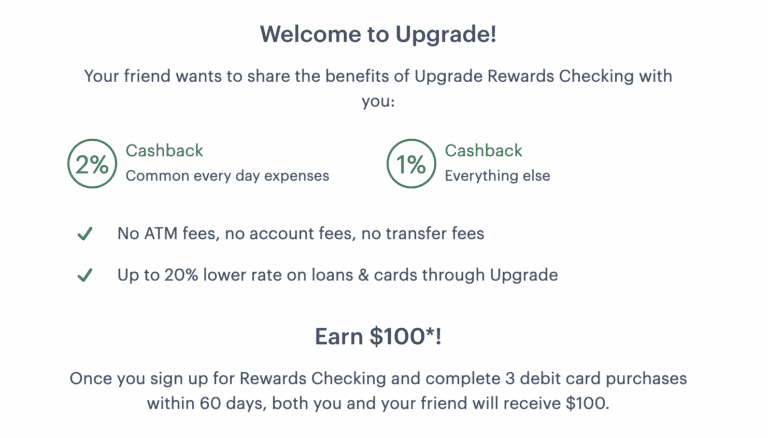
In terms of features, Upgrade could be useful for regular use too. In particular, it offers 1% cashback on all purchases and 2% cashback on purchases at convenience stores, gas stations, restaurants, monthly subscriptions, and utilities. There aren’t many bank accounts that offer cashback like that, which makes Upgrade a potential option if you have certain purchases that you can only pay with a debit card.
With that background out of the way, let’s look at how to earn your Upgrade referral bonus. Here’s what you need to do:
1. Open An Upgrade Account Using A Referral Link. The first thing you’ll need to do is open an account using a referral link. Here is my referral link so you can earn your bonus.
When you click the referral link, you’ll see a screen like the one below.
Opening the account is straightforward. When I opened my account, it was approved instantly.
I recommend downloading the Upgrade app, as that’s the easiest way to manage your account. You can also manage it on your computer if you prefer.
2. Complete 3 Debit Card Purchases Within 60 Days. After opening your account, Upgrade will send you a debit card. It’ll generally take a week to 10 days or so to arrive. Once you receive your debit card, you’ll need to activate it, then complete three debit card transactions within 60 days.
Fortunately, the three debit card transactions can be for any amount. I usually find the easiest way to meet debit card transaction requirements is to buy three fifty-cent Amazon gift cards. Another easy way to meet this requirement is to make three small payments to something like your phone bill or internet bill. Since you have 60 days to meet this requirement, you shouldn’t have any issues with finding a way to make three purchases.
Of course, since this is a debit card, you’ll also need to put some money into your Upgrade checking account. You can link an external bank account using the Upgrade app or on the website. You’ll find it in the menu section, under “External Bank Accounts.”
When you open your Upgrade account, you’ll also get a referral link that you can use to refer other people to Upgrade. You’ll find your referral link on the main page of the app.
Each person you refer will earn $100 if they meet the requirements. You’ll also earn $100 for each person you refer. If you’re a two-person household, that means you can earn an easy $300 with just a few minutes of work.
First, you’ll open your own Upgrade account using a referral link. Then you’ll want to refer your spouse or partner using your link. If you do this correctly, you’ll earn $100 for opening your account, your spouse will earn $100 for using your referral link, and you’ll earn another $100 for referring your spouse.
The terms state you can earn up to 10 referral bonuses per year, so there’s room to earn quite a bit if you have other people you can refer. Just remember that the current $100 promotion is scheduled to end on September 30th, so if you want to maximize your referrals, do it now.
Upgrade is an interesting, free cashback checking account offering a good, easy referral bonus. The account has no fees or minimum balance requirements, which makes it a particularly easy bank bonus to earn. I recommend getting in on it as soon as you can. I suspect that they will still offer a referral bonus after September 30th, but it’ll likely be lower than the current $100 promotion.
I just checked & the $100 Referral Bonus has been extended through the end of October, 2022. They keep extending it but know that it could go down or be cancelled so get your free $100 asap & then share your link to earn a bunch more. Who doesn't like free money? (Yes, I got my $100 from being referred and am now referring others to earn even more.)